My Latest Work
The Keeper
A first-person Horror game where you explore, collect lore, and repair broken machines through hands-on minigames while navigating through different events and risks.
| Field | Detail |
|---|---|
| Engine | Unreal Engine 5 (Blueprints) |
| Role | Gameplay & Systems Programmer |
| Dates | Aug. 2026 – Present |
| Team | Team Project (14 members) |
| My focus | Minigames, player controller, interaction, lore collection |
Design decisions to talk about
- Interfaces over casting: BPI_MinigameParticipant lets a minigame request a session without casting to BP_Player.
- Components over one big Blueprint: stamina, footsteps, lore inventory, and sessions are separate components.
- Avoiding circular dependencies: BPC_Footsteps uses a generic Character reference instead of BP_Player.
- Respecting teammates' code: the carry bridge integrates with BPC_Carryable instead of rewriting it.
Refueling Minigame
The Keeper (Unreal Engine 5, Blueprints)
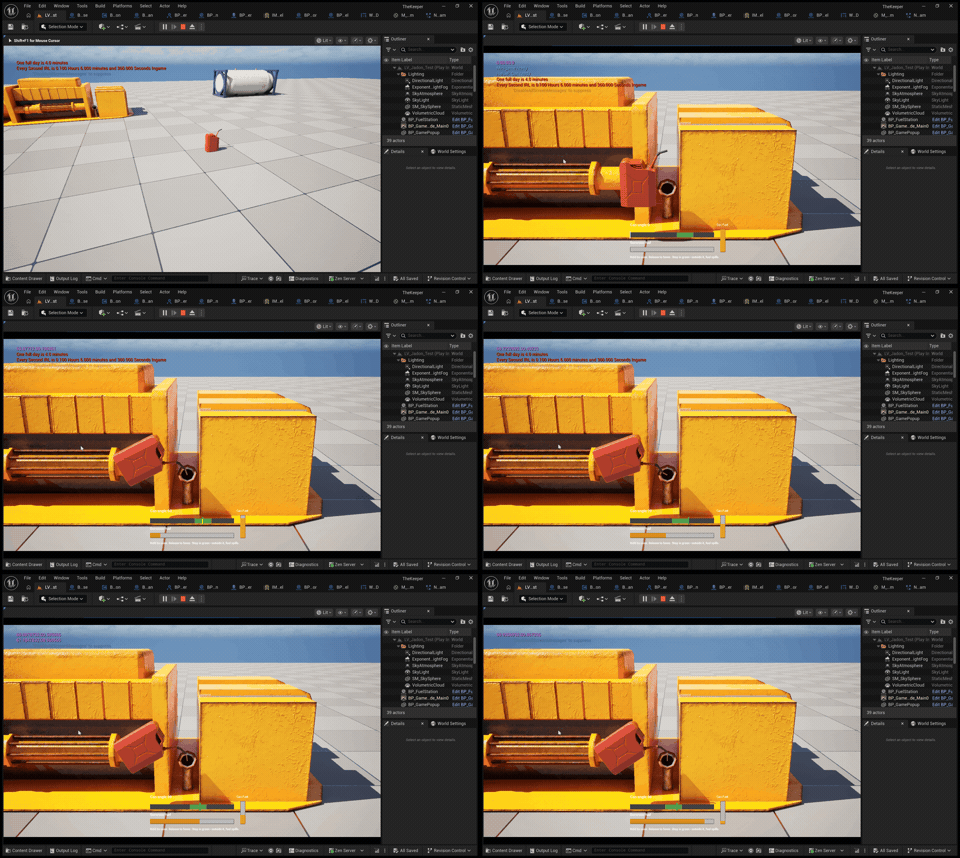
Fill a jerry can at the fuel tank (not seen in GIF), carry it to the generator, and tilt it carefully to pour. Spill too much and you’ll have to go back for more.
- Built a tilt-to-pour mechanic: hold left mouse to tip the can forward, and release to lower it
- Created a moving sweet spot that players follow to transfer fuel. Pouring outside it wastes fuel without filling the generator
- Added a pour threshold, so lowering the can stops fuel loss right away
- Designed a resource loop: running out of fuel sends the player back to the external tank to refill
- Built a HUD showing tilt, the sweet spot, generator progress and remaining fuel in the can [Placeholder UI].
- Added a Niagara fuel stream that appears only while fuel is actually transferring [Placeholder FX].
- Generator progress persists when the player leaves and returns, and filling it completes the repair using the Gameplay Tag Generator.Gas.Full
- Built on my reusable minigame framework, which handles the camera transition, input switching and the entry/exit lifecycle
Built with: Blueprints, Enhanced Input, Niagara, UMG, Gameplay Tags
Blueprint Snippets
Project Summary
I built The Keeper's reusable minigame framework, the system behind every repair task in the game. Players walk up to a machine, switch to a dedicated camera, and fix it piece by piece. I also built the first-person controller, stamina-based sprint, surface-aware footsteps, and the lore collection system.
Feature Breakdowns
- A shared parent Blueprint (BP_MinigameBase) owns repair conditions, camera settings, and piece/slot behavior.
- Child minigames only add what's unique to them. Overridable rules (AllowsPiecePlacement, AllowsPieceRemoval) let a minigame add restrictions without touching the base.
- Event dispatchers (OnConditionChanged, OnRepairStateChanged, OnTaskCompleted, OnSlotOccupancyChanged) let other systems react without tight coupling.
- Total Minigame Base framework: ~21 hr
- Each machine tracks separate requirements as Native Gameplay Tags (for example Engine.Gas.Full, Engine.Filter.Clean).
- A machine counts as repaired only when every required tag is satisfied.
- OnBreak resets only the conditions you choose, so a machine can fail selectively without undoing unrelated repairs.
- Progress stays when the player leaves and comes back during a play session.
- Part of the Total Minigame Base framework: ~21 hr
- BPC_MinigameSession on the player handles entering, playing, and leaving a minigame.
- On entry it saves the old view target, spawns a camera at the minigame's CameraAnchor, locks normal movement, and swaps Enhanced Input mapping contexts.
- On exit it restores the camera, controls, and input, then cleans up.
- An Idle / Entering / Active / Exiting state enum blocks repeated or conflicting entry and exit requests.
- Part of the Total Minigame Base framework: ~21 hr
- Pieces support select, hold, manipulate, finish, and cancel. Slots accept only matching piece types (by Gameplay Tag) and support removal.
- BPC_MinigameCarryBridge connects the existing hand-carry system to slots, so players can carry a part over and install it.
- The bridge works without modifying the BPC_Carryable component. If a pickup from a slot fails, it restores the previous hand and slot state.
- Total Minigame Base framework: ~21 hr
- Input requests sprint, and BP_PlayerState decides if it's allowed (movement, grounded, enough stamina, exhaustion lock).
- BPC_Stamina is its own component, so future actions like a dodge can share the same resource.
- Exhaustion blocks sprinting again until Shift is released and stamina recovers.
- Sprint and Stamina: ~4 hr 30 min
- First person camera movement: ~2 hr
- BPC_Footsteps traces down to read the floor's Physical Material and plays the matching sound, with a default fallback and slight pitch variation.
- Walking and sprinting use different step timing and volume, driven by actual sprint status.
- Surface-aware footsteps: ~3 hr
- Interaction runs through the BPI_Interactable interface, so any object can respond without casting.
- Lore objects add an ST_LoreEntry to the player's lore inventory and destroy themselves only after a successful add.
- The inventory rejects missing or duplicate IDs and is ready for future UI & system integration.
- Lore Objects: ~3 hr
Player Movement, Stamina, & Lore Collection
A first-person controller with stamina-based sprinting, plus a lore pickup that saves to the player’s lore inventory.
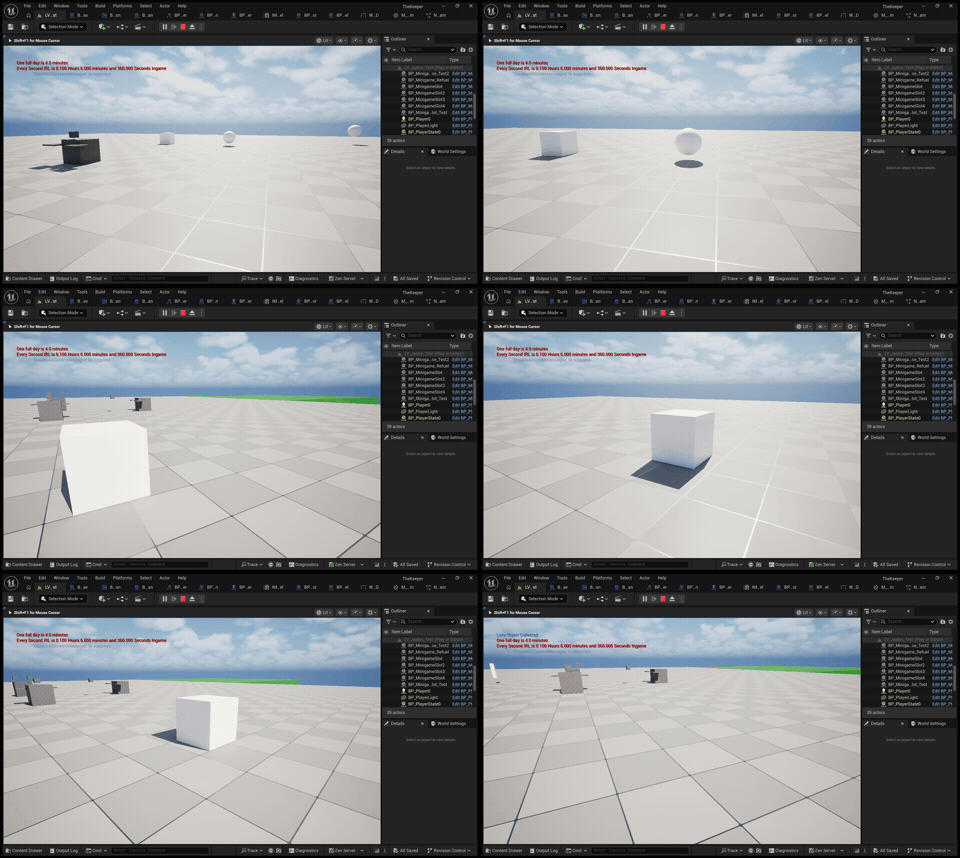
Sprint & stamina
- Hold Shift to sprint. The player asks to sprint, and the PlayerState decides whether it’s allowed (moving, on the ground, enough stamina)
- Stamina drains while sprinting and regenerates after a short delay
- Run out of stamina and the player drops back to walking speed, which you can see in the GIF. An exhaustion lock blocks sprinting again until Shift is released and stamina recovers
- Stamina is a standalone component, so future actions like a dodge can share the same resource
- A stamina bar isn’t in yet. Right now the slowdown is the only sign you’ve run out.
Lore collection
- Walk up to a lore object and interact to collect it. It disappears once it’s collected
- Its ID, name and description are saved to the player’s Lore Inventory, which is hidden for now.
- The pickup only disappears after the inventory confirms the save, and duplicate entries are rejected
Camera Movement
- Built first-person camera controls with adjustable mouse sensitivity, using only the camera’s yaw (left/right direction) for movement so looking up or down never changes the player’s walking direction.
Also built (not shown in the GIF)
- Surface-aware footsteps: a downward trace reads the floor’s Physical Material and plays a matching sound. Steps are faster and louder while sprinting
Built with: Blueprints, Enhanced Input, Blueprint Interfaces, Physical Materials
Robot Rhythm
A rhythm runner where taps and swipes make your robot jump, duck, brake, and accelerate on the beat while teammate robots react to how well you play.
| Field | Detail |
|---|---|
| Engine | Unity (C#) |
| Role | Gameplay Programmer |
| Dates | Aug. 2026 – Present |
| Team | Team Project (6 members) |
| My focus | Action system, obstacle timing, sprite animation, gesture input (contributor) |
Robot Actions
Robot Rhythm (Unity, C#)
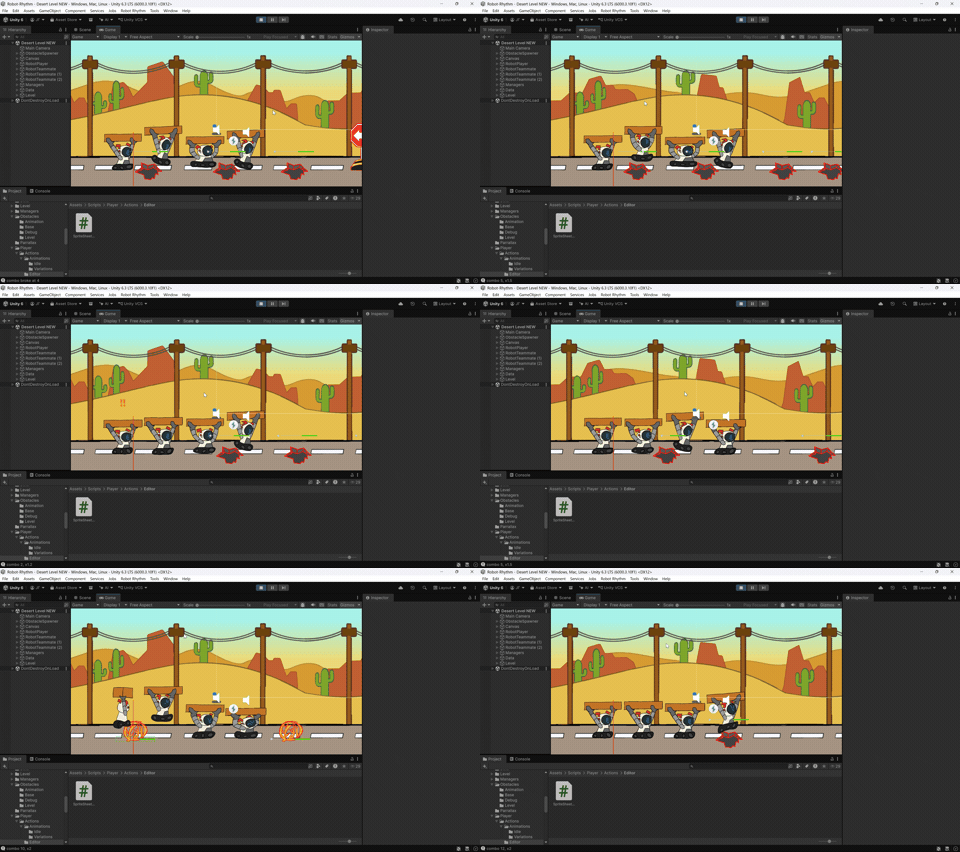
Tap to make the robot jump, swipe up to charge a long jump, swipe down to duck, swipe left to brake, or swipe right to Accelerate, with every action timed to the beat.
- Created a reusable ActionBase/ActionManager system, so the player and teammate robots share the same actions
- Jump: a tap triggers a normal jump with squat, airborne and landing animation phases
- Charge jump: hold an upward swipe to charge, then release to launch. A charge slider and a looping charge animation show how far along the charge is
- Brake: a held swipe triggers the brake. It plays its own animation and nudges the robot backward visually by an adjustable amount
- Actions trigger when you release the input, so players can land them on the beat
- An adjustable input buffer queues the next action if it’s pressed near the end of the current one
- Each action has animation variations for Perfect, Early/Late and Failed timing results
- Contributed to the gesture input system that recognizes taps and held swipes
Also built (not shown in the GIF)
- Accelerate: the opposite of brake. It plays its own animation and moves the robot forward visually
- Duck: a swipe-triggered action for ducking under obstacles
Built with: Unity, C#, sprite-sheet animation, custom Inspector tools
Project Summary
I created Robot Rhythm's reusable action system and contributed greatly towards the shared timing logic that grades every obstacle. I also built the sprite-sheet animation pipeline and contributed to the gesture input system. My work connects player input, robot actions, and the song clock so every move lands on the beat.
Feature Breakdowns
- I created the ActionBase / ActionManager architecture so the player and teammate robots share the same actions.
- Actions include normal jump, charged long jump, duck, brake, and accelerate, each with its own animation.
- An adjustable input buffer lets a request near the end of one action queue the next.
- Estimated total work time: ~15-20 hr
- Contributed towards tap-to-jump and held-swipe recognition for long jump, duck, brake, and accelerate.
- Actions trigger on release, so players can time them to the beat.
- Long-jump charging only activates during an upward gesture, with a charge slider and swipe-direction indicators for feedback.
- Helped connect the newer InputManager to PlayerController and ActionManager.
- Total contributed time: ~2 hr
- Shared timing logic in ObstacleBase with configurable early and late windows and a Perfect threshold.
- Each attempt gets an accuracy score from 0 to 1 and a result: success, early, late, wrong input, or missed.
- Success is tracked separately from accuracy, so a barely-on-time input still counts as a hit.
- Result events let scoring and feedback systems listen in. Pothole, brake, and accelerate obstacles each have their own rules.
- Connected obstacle preparation and evaluation to beat-map targets and the song clock.
- Estimated total work time: ~15-20 hr
- Animations play from sliced sprite sheets instead of individual frames, with custom Inspector tools to collect and refresh frames.
- Running loops automatically and resumes after actions. Jumps support optional squat, airborne, and landing phases to allow for smoother animations.
- Coordinated running, charging, actions, and feedback so they never fight over the sprite.
- Estimated total work time: ~4 hr
- Each action has animation variations for default, Perfect, Early/Late, and Failed results.
- Teammate robots react to the player's results, but yield to upcoming gameplay actions.
- Obstacles can loop their own animations and respect each stage's visual variants.
- Estimated total work time: ~3 hr
- Wrong animation frame order: diagnosed it to uneven sprite-sheet slicing, then added optional numeric sprite-name sorting.
- Long-jump charging not triggering with held upward swipe: InputManager lacked a function that communicated the players' current held swipe, only broadcasting to the Player Controller on swipe release. I created a function in the InputManager that allowed the Player Controller to subscribe to the players' current held swipe so that it could detect held upward gestures and update the Player sprite's animation accordingly.
- Testing before the rhythm system existed: built temporary obstacle timing tests, then added gizmos and labels to visualize input windows in the editor.
Code Snippets
1. Obstacle Timing Evaluation (ObstacleBase.cs)
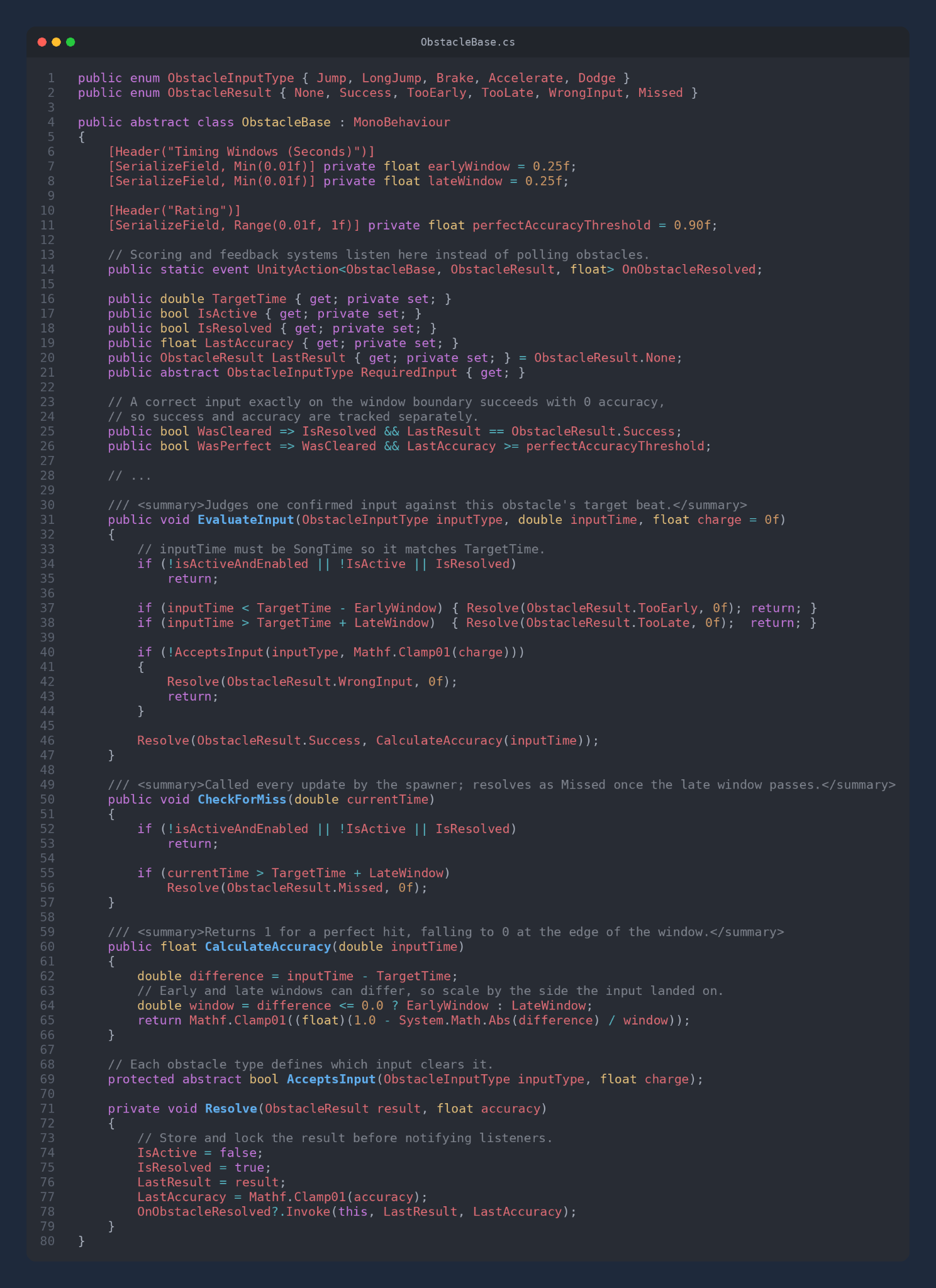
Context: Every obstacle in Robot Rhythm needs to judge whether the player’s input landed on the beat. I wrote one shared abstract base class that handles timing windows, accuracy scoring and result events. Each obstacle type only defines which input it accepts.
Why I built it this way
- Template pattern: the base class owns all the timing math, and child obstacles (pothole, brake, accelerate) only override AcceptsInput
- Events over references: scoring, SFX and teammate reactions subscribe to OnObstacleResolved, so obstacles don’t need to know those systems exist
- Lock, then notify: Resolve saves the result before firing the event, so a listener can’t trigger a second judgment
2. Reusable Robot Actions (ActionBase.cs)
Context: The player robot and the AI teammate robots needed to perform the same actions. I created a plain C# base class that every action inherits from, and each robot’s ActionManager drives it.
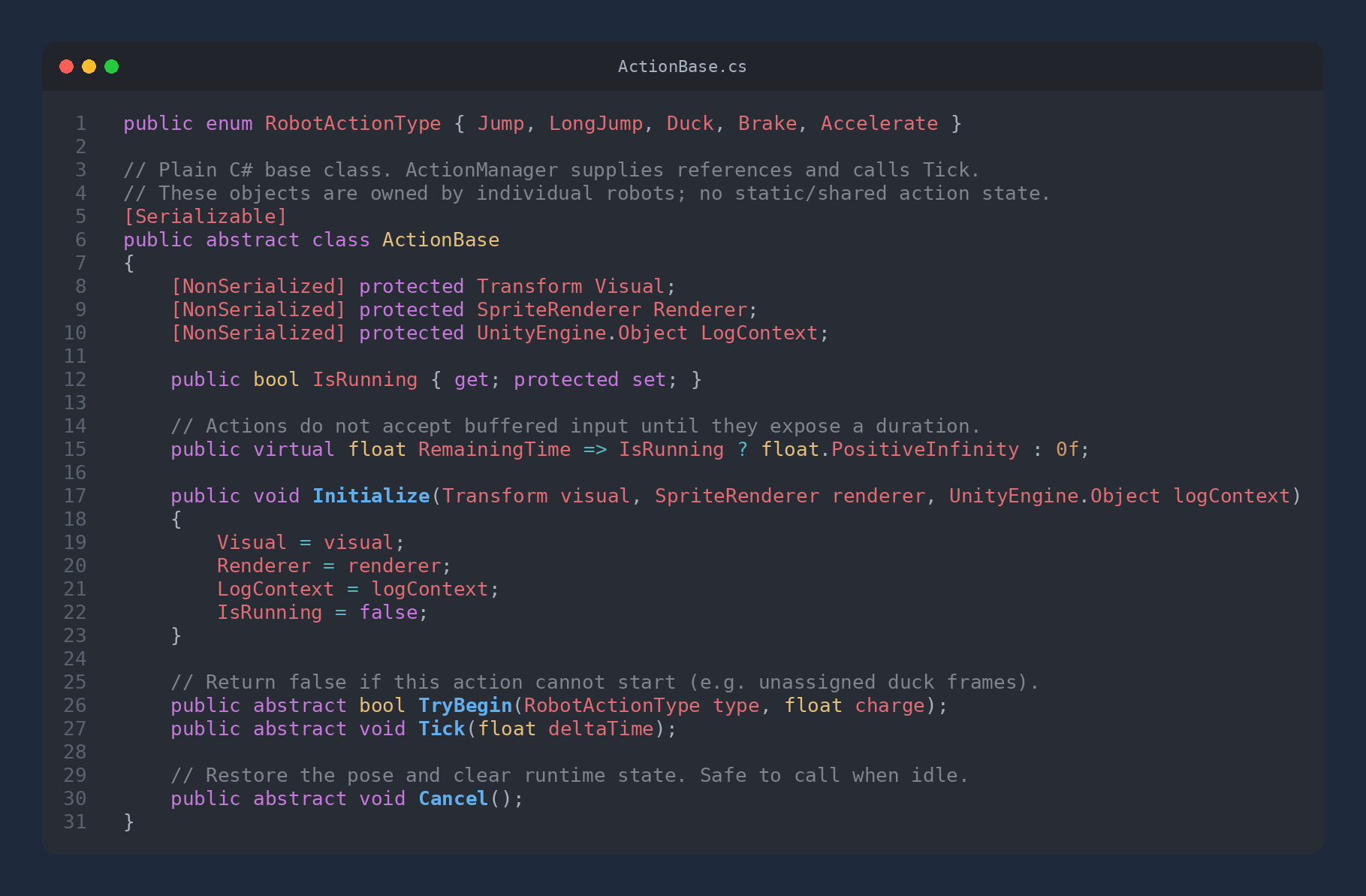
Why I built it this way
- Plain C# instead of MonoBehaviour: actions are lightweight, [Serializable] so they’re tunable in the Inspector, and owned per robot with no shared state
- A small, clear contract: start, tick, cancel. Adding a new action means writing one class
- A safe default: RemainingTime returns infinity until an action reports its duration, so new actions can’t accept buffered input by accident
3. Action Manager & Input Buffer (ActionManager.cs)
Context: In a rhythm game, players often press the next input slightly before the current action finishes. I built an input buffer that holds one request during the last moments of an action and runs it the instant the action ends.
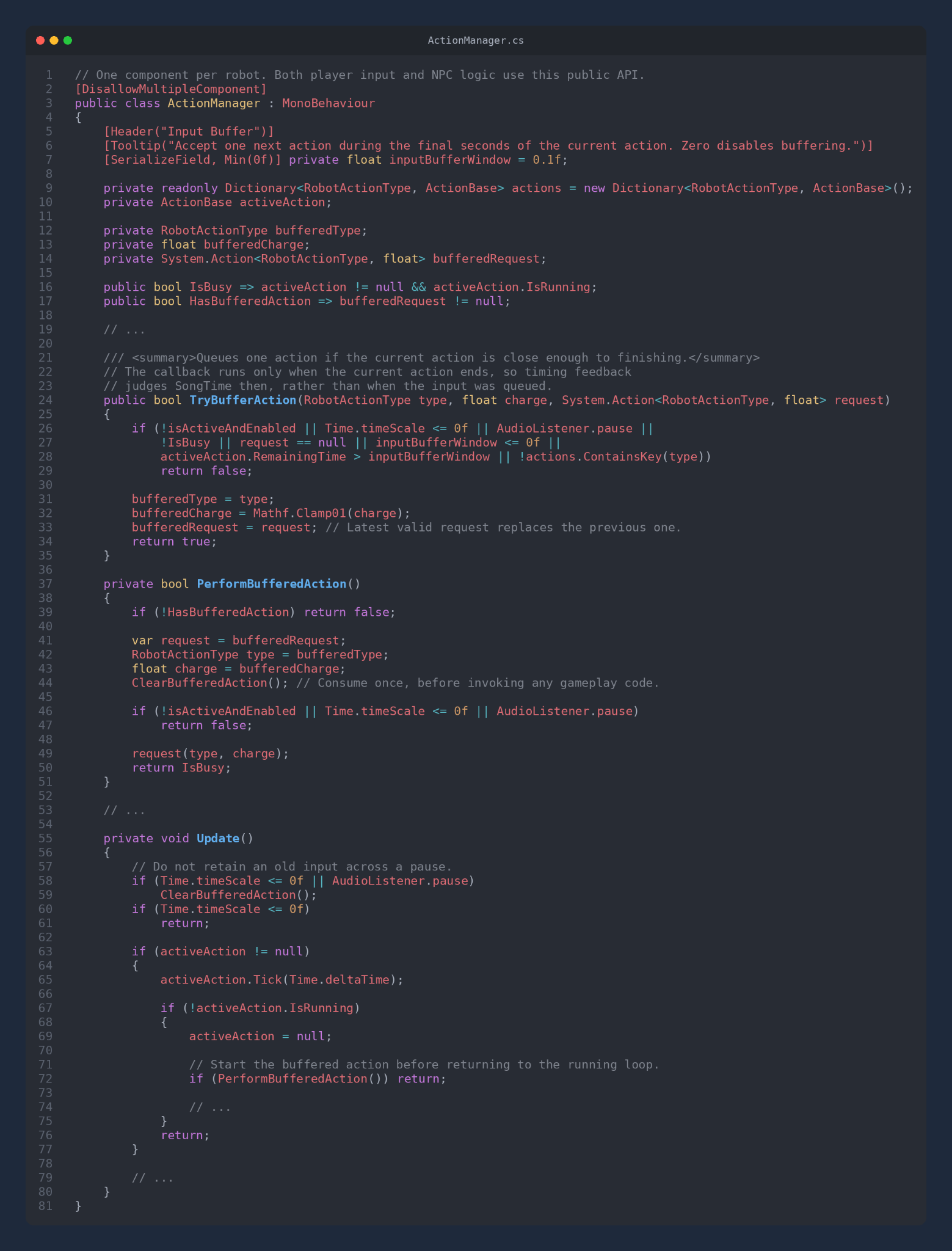
Why I built it this way
- One API for everyone: player input and NPC teammate logic both call TryPerform, so the AI robots behave exactly like the player
- Judged when it runs, not when it’s queued: the buffer stores a callback, so the rhythm judgment uses the song time when the action actually starts
- Edge cases handled: the buffer clears on pause, a newer input replaces an older one, and each request is consumed before it runs so it can’t fire twice
Endgame
A 3D Puzzle Platformer game where a Dimension-leaping ninja races the clock through nonlinear levels and must beat every one fast enough to win.
| Field | Detail |
|---|---|
| Engine | Unity (C#) |
| Role | Gameplay & UI Programmer |
| Dates | Mar. 2026 – Apr. 2026 |
| Team | Team Project (6 members) |
| My focus | Timer and win/loss logic, leaderboard, UFO movement, UI overhaul, audio, 3D props |
Video Showcase
A Puzzle Platformer that takes place in a dystopian virtual reality.
Use the power of your experimental stopwatch to flip between dimensions for a small period of time!
Additional Features:
- An open hub world, experience any level in any order.
- Breakable platforms that will crumble beneath your feet.
- Switches that activate gates in non-linear level design
- A competitive timer unique to each level. Can you make it in time?
Relevant Links: https://studiodanny.itch.io/en...
Project Summary
On Endgame I owned the systems that make racing the clock matter: per-level best times, the hub leaderboard, and the final win/loss check. I also scripted the UFO and asteroid movement, as well as created their models, overhauled every UI screen, implemented the game's sound and music, and modeled the UFO and asteroid.
Feature Breakdowns
- Saves the player's best time for each level.
- Text turns red when the clock hits 0 and goes into overtime.
- A warning tick starts at 10 seconds, speeds up as time runs out, and stops at 0.
- Level times can be added into a total "high score" to encourage speedruns.
- Shows the best time for every level in the hub.
- White means no time yet, green means beaten fast enough, and red means too slow.
- Levels can be played in any order, so the door first checks that every level has a completion time.
- It then checks each time against the limit: all fast enough loads the Win screen, and any too slow loads the Lose screen.
- Moves continuously in a direction or toward a target object.
- Can travel between multiple waypoints and loop (A to B to C to A).
- Spins on the Y axis and wobbles within a set limit on X and Z, so the UFO looks like it's flying.
- Destroys itself once off-screen to save performance. Settings are adjustable in the Inspector.
- Overhauled every UI screen: new backgrounds, bloom on text, the ninja on Win/Loss screens, and the moving UFO.
- Built the Win, Game Over, Level Select, and How To Play scenes, and revamped Credits and Controls.
- How To Play uses toggle buttons: click to show a panel, click again to hide it, click another to switch.
- Added a music volume slider to the pause screen.
- Implemented SFX for UI, jumping, key pickups, switches, win/loss, and warnings, plus title music that carries across menu screens.
- Added a glow outline to the player material.
- Modeled and textured the UFO, and modeled the asteroid.